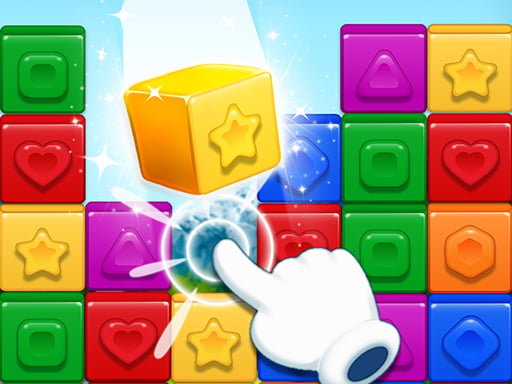
What is Tile Master - Classic Match?
Tile Master - Classic Match is a free, relaxing block puzzle game developed by XTStudio. The official description calls it a “relaxing and enjoyable zen game” — a simple, exciting puzzle that suits entertainment, intense study breaks, and relaxation after working hours. It is a one-player game, and our data tags it with Block, Clash, Crazy, and Skills, which hints at the mix of quick thinking and steady hands the game asks for.
The core idea is easy to explain and easy to start: you have blocks to place, and a board to place them on. Tap any block to drag and drop it onto the board, and three identical blocks will be removed from the board. Your goal is to clear all blocks as soon as possible. When all blocks are cleared, you have completed the level. But there is a limit: when there are 7 blocks on the board, you lose. That single rule is what turns a calm matching game into a puzzle you have to think about.
It is for players who like short, self-contained puzzle sessions — the kind you can pick up in a spare minute and put down without a long commitment. It is free to play, and it runs in the browser at a portrait-friendly 600x800 size, which suits phones and tablets especially well. To start, just open the game and tap a block to drag it onto the board.
How to Play
The rules of Tile Master - Classic Match are short enough to learn in one sentence, but the board state is what makes each attempt different. Here is the loop, based only on the official instructions:
- Tap a block. Any block can be picked up with a tap. This is the start of every move.
- Drag and drop it onto the board. The block leaves its spot and lands on the board.
- Match three identical blocks. When three identical blocks are on the board, they are removed from the board. This is the only way blocks leave the board.
- Clear all blocks as soon as possible. When all blocks are cleared, you have completed the level.
- Watch the board limit. When there are 7 blocks on the board, you lose.
That is the whole game. There are no hidden modes, boosters, or special tiles described in the official source, so the challenge comes entirely from how you sequence your placements. Every block you place that does not complete a set of three stays on the board and counts toward the seven-block limit. Every block that completes a set of three disappears and gives you room to keep going.
Because the loss condition is a count of blocks on the board rather than a timer, the game rewards planning over speed. You can take your time reading the board, but you cannot take your time placing blocks carelessly — a few mismatched placements can fill the board before you find the third copy of anything.
The game is designed to be relaxing, and the zen framing in the official description fits: there is no described clock, no described score, and no described penalty beyond the seven-block limit. The pressure is entirely spatial and logical. That makes it a good fit for a study break or a wind-down session, where you want your brain engaged but not stressed.
Controls
Tile Master - Classic Match uses a single, consistent input style across devices.
| Input | Action |
|---|---|
| Tap | Pick up any block |
| Drag and drop | Place the block onto the board |
| Touch screen | Play the whole game with taps and drags on mobile |
There are no described keyboard bindings, no described buttons, and no described menu controls in the official instructions. Everything you do in the game is a tap followed by a drag. On a phone or tablet, that means one thumb is usually enough. On a desktop browser, the same gestures map naturally to a mouse: click to pick up, drag to move, release to drop.
Because the game is listed at 600x800, the play area is tall and narrow — a portrait layout. That is worth knowing before you start: it is comfortable on a phone held upright, and on a desktop it will appear as a tall panel rather than a wide one. If you are playing on a laptop, you may want to keep the window at a comfortable size so the blocks are easy to tap precisely.
Beginner Strategy
The first thing to internalize is the seven-block limit. It is not a soft warning — it is the loss condition. In a game where three identical blocks are removed and seven on the board ends the run, the safe zone is small. Think of the board as having very little slack, and treat every placement that does not complete a set as a cost you are paying.
A few beginner habits that follow directly from the official rules:
- Count before you place. Before you drag a block onto the board, check whether it completes a set of three. If it does, the board stays clear. If it does not, you are one step closer to seven.
- Prefer placements that finish a set. When you have a choice between two blocks, the one that completes a trio is almost always the better move, because it removes blocks instead of adding them.
- Keep the board as empty as you can. The official goal is to clear all blocks as soon as possible, and an empty board is the safest board. Every removal buys you room for the next few placements.
- Slow down near the limit. If the board is getting crowded, stop and re-read the available blocks before your next drag. A rushed placement at five or six blocks on the board is how runs end.
In matching games like this, it also helps to scan the whole set of available blocks before making a move, rather than grabbing the first one you see. The blocks you leave behind matter as much as the one you place.
Intermediate Tips
Once you are comfortable with the basic loop, the next step is thinking a move or two ahead. The official rules do not describe a move limit or a timer, so the real skill is board management: keeping the count low while working toward clearing everything.
- Plan in trios. Instead of asking “where does this block go?”, ask “which three blocks am I trying to bring together?” Grouping your thinking around sets of three keeps you focused on the only action that removes blocks.
- Watch what you are leaving behind. A placement that does not complete a set still changes the board. If you place a block that has no partners in sight, you have spent one of your few safe slots on a block that may sit there for a while.
- Use the board as a buffer, not storage. The board is where blocks go to be matched, not where they go to wait. If a block is sitting on the board without two partners available, it is a liability.
- Reset your read after every removal. When three identical blocks are removed, the board changes. Re-scan the remaining blocks and the available blocks before your next move, because the best placement may have changed.
If you enjoy this style of play, Mahjong Master: Tile Sort and Match and Goods Sort Match Puzzle are close cousins — both are about sorting and matching tiles, and both reward the same patient, scan-first approach. Clever Match is another matching puzzle worth a look if you like the “find the set” rhythm.
Advanced Strategy
At a higher level, Tile Master - Classic Match becomes a game of risk management around the seven-block ceiling. The official rules give you exactly one failure state, so expert play is about staying far away from it while still making progress toward an empty board.
- Treat six blocks as a red line. If the board reaches six, your next placement must complete a set or you lose. Plan the move that gets you back down before you get there, not after.
- Sequence removals to open space. When you can complete more than one set in a row, the order matters less than the fact that each removal frees the board. Chain your removals when you can, and use the breathing room to set up the next trio.
- Read the whole block pool. The blocks available to you are the raw material for every set. Knowing which trios are possible tells you which placements are safe and which are gambles.
- Accept that some placements are investments. Occasionally you may need to place a block that does not complete a set in order to reach a block that does. That is fine as long as you have counted the cost and you know the board can absorb it.
If you want to test the same “keep the board under control” skill in a different format, TideRoll: Block Puzzle and Blocks Match Game are both block puzzles in the same family. 2244 Number Match swaps tiles for numbers but keeps the matching mindset. And if you like the calm, tidy feeling of this game, Cozy Garden offers a similarly relaxed pace.
Common Mistakes to Avoid
Most failed runs in Tile Master - Classic Match come down to a handful of avoidable habits. None of them require special knowledge to fix — they just require attention.
- Placing without counting. The most common mistake is dragging a block onto the board without checking whether it completes a set. In a game where seven blocks ends the run, every careless placement is expensive.
- Ignoring the board count. It is easy to focus on the blocks in your hand and forget how many are already on the board. Check the count before every drag.
- Hoarding blocks on the board. Blocks on the board are not progress unless they are part of a trio. A board full of singletons is a board that is about to end your run.
- Rushing the last few blocks. When the board is nearly clear, the temptation is to speed up. That is exactly when a single mismatched placement can push you to seven. Slow down at the end, not just at the start.
- Forgetting to re-scan after a removal. When three blocks are removed, the board is different. Players who keep executing an old plan after a removal often miss the better move that just became available.
Is Tile Master - Classic Match Right for You?
Tile Master - Classic Match is a good fit if you want a free, low-pressure puzzle that you can play in short bursts. The official description frames it as a zen game suitable for entertainment, study breaks, and relaxation after work, and the rules back that up: one input style, one clear goal, and one simple failure condition. There is nothing to learn beyond tap, drag, and match three.
It is a strong choice for mobile players in particular. The 600x800 portrait layout and tap-and-drag controls suit a phone or tablet, and the one-player design means you can play at your own pace without waiting on anyone. If you like block puzzles, tile matching, or sorting games, this sits comfortably alongside the rest of the Match & Merge Games category.
It may be less appealing if you want a game with described levels, scores, timers, or progression systems — the official source does not describe any of those, so the appeal here is the pure matching loop. If you are looking for something with more moving parts, browse Sorting & Logic Puzzles for alternatives in the same thoughtful, puzzle-first spirit.
Either way, the best way to find out is to start a run. Open the game, tap a block, and see how long you can keep the board clear.